Selected case study / 032026

Task
Board

One shared view of what's next, what's moving, and what's done.

Discipline
Product design
Product
Project management SaaS
Platform
Web application / 1440px desktop
Scope
24 screens, from sign-in to billing

A calm workspace for teams who plan, track, and ship together.

TaskBoard is a project management workspace designed for a studio team. The Figma file covers the whole product: onboarding, a home dashboard, a projects portfolio, every project view (overview, list, board, timeline, and calendar), task details, personal task and inbox areas, team messages, files, workload planning, time tracking, reports, automations, and workspace settings and billing.

Many views of the same work, one source of truth.

02 / The challenge

Project tools grow into many screens. Teams need to see status, owners, dates, and priority without opening each task.

Keep a large product easy to scan.

What that means

The same task shows up on the board, in lists, on the timeline, and in the calendar. Each view needs to feel like part of one system, with consistent labels, colors, and controls.
03 / The design direction

A single navigation model (Home, My tasks, Inbox, Projects, Messages, Files, Team, Workload, Time tracking, Reports, Automations) with project views as tabs on top.

Organize around how teams work.

Design response

Workspace-level destinations stay in the left rail. Everything that belongs to one project lives under its tabs: Overview, List, Board, Timeline, Calendar, and Files.

Make shared work easier to see and move.

01 / ORIENT

Orient people fast.

A persistent left rail, workspace switcher, breadcrumb, global search, and favorite projects show where you are at all times.

02 / SCAN

Make status scannable.

Status colors, priority flags, due dates, and assignees give each card a clear hierarchy.

03 / FILTER

Let people narrow down.

Assignee, priority, and grouping controls plus task search sit above every project view.

04 / CONTEXT

Keep context with the task.

Description, subtasks, attachments, comments, dependencies, and time tracking live together on the task detail page.

05 / SYSTEM

Build one visual language.

A single purple accent, quiet neutrals, Inter type, and repeated card, table, and form patterns across all 24 screens.

Three screens that carry the product.

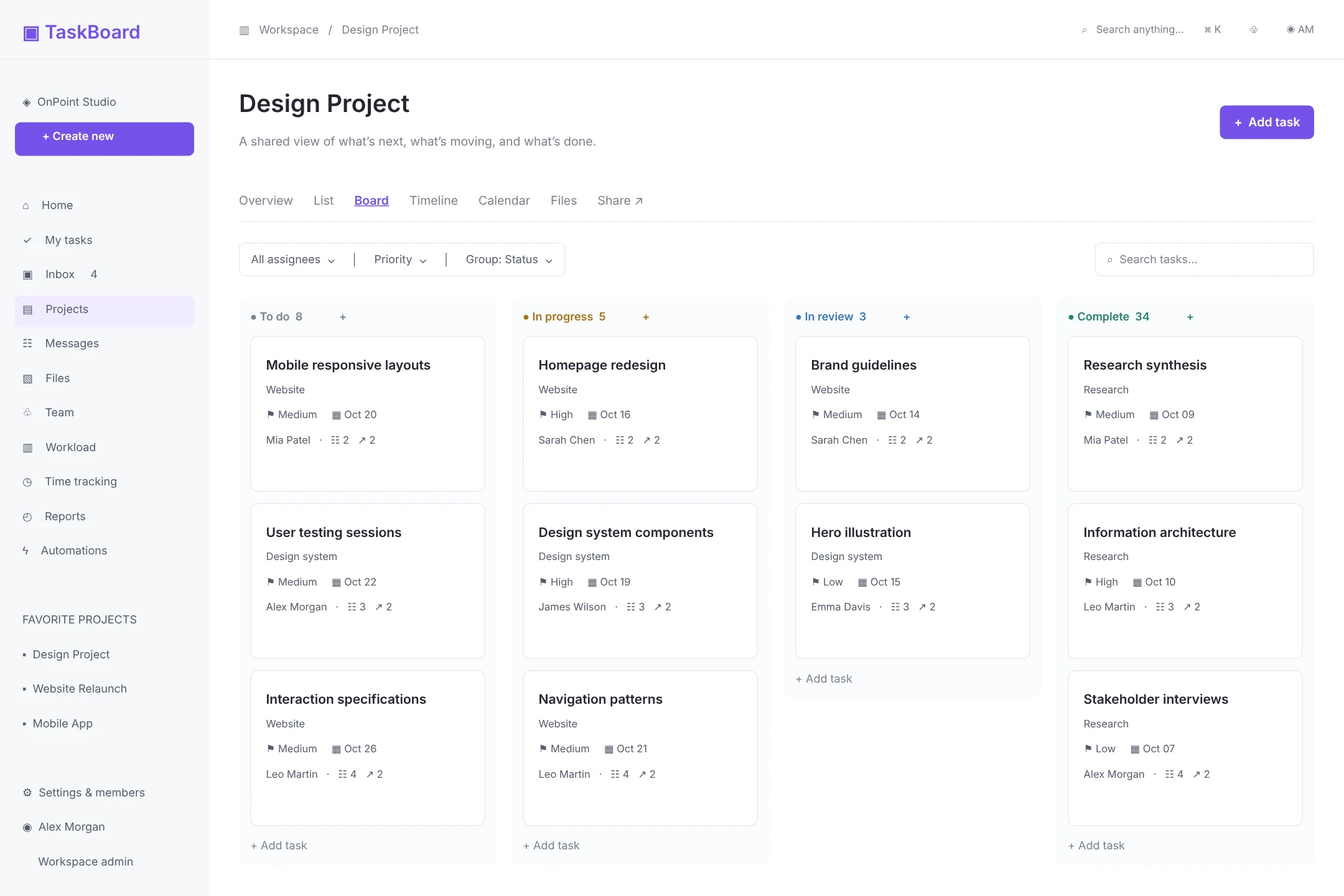
01 / Kanban board

The board groups tasks into To do, In progress, In review, and Complete, each with a live count and an add-task shortcut.

See what is next, moving, and done.

Card design

Each card shows the task name, its group, a priority flag, the due date, the assignee, and subtask and link counts. Status colors on the column headers (grey, amber, blue, green) make progress readable at a glance.

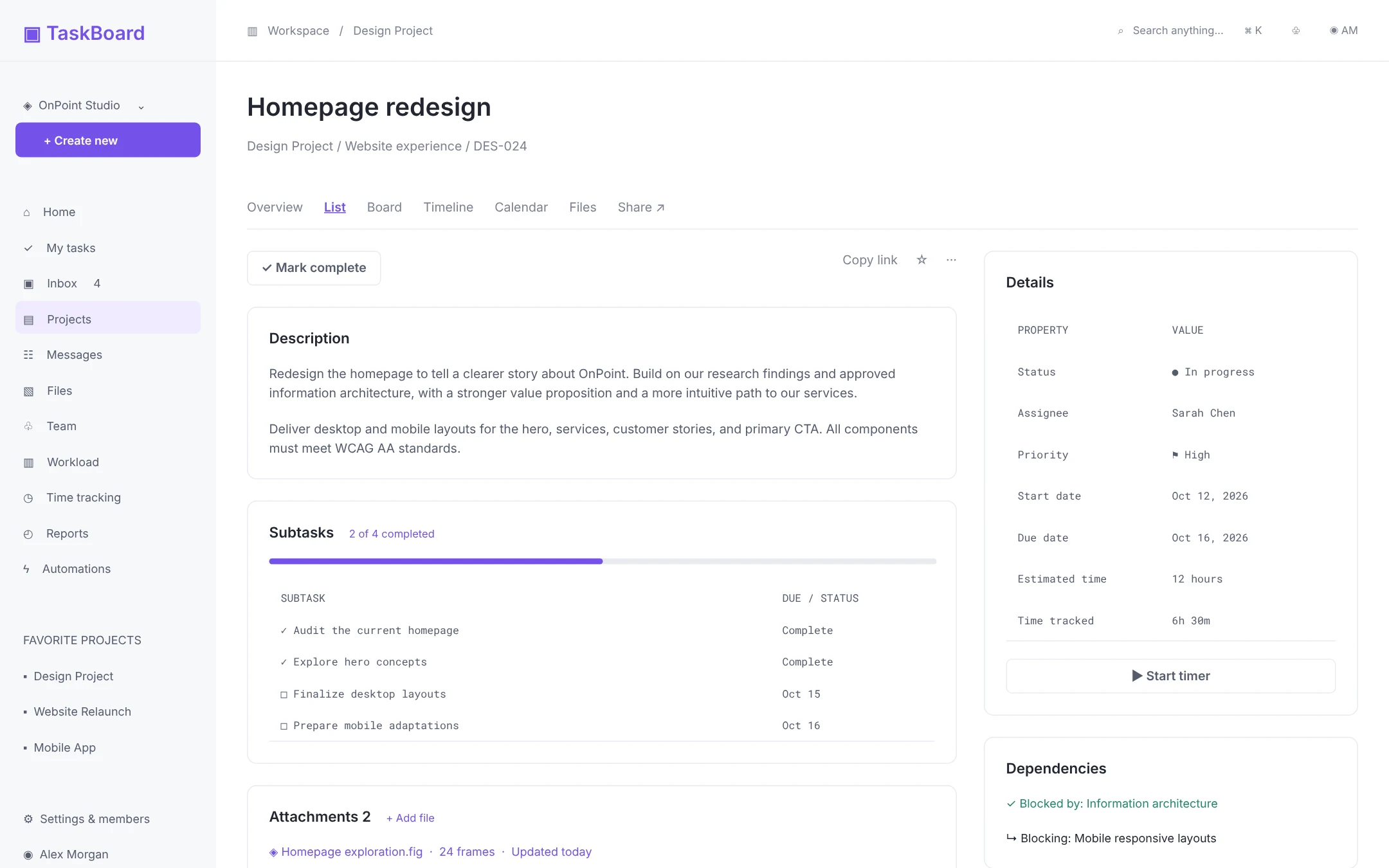
02 / Task details

A two-column page: the work on the left, properties on the right.

Everything about a task in one place.

What it holds

Description, subtasks with a progress bar (2 of 4 completed), attachments, and comments with @mentions. The side panel lists status, assignee, priority, dates, estimated and tracked time, a start-timer action, dependencies, and collaborators.

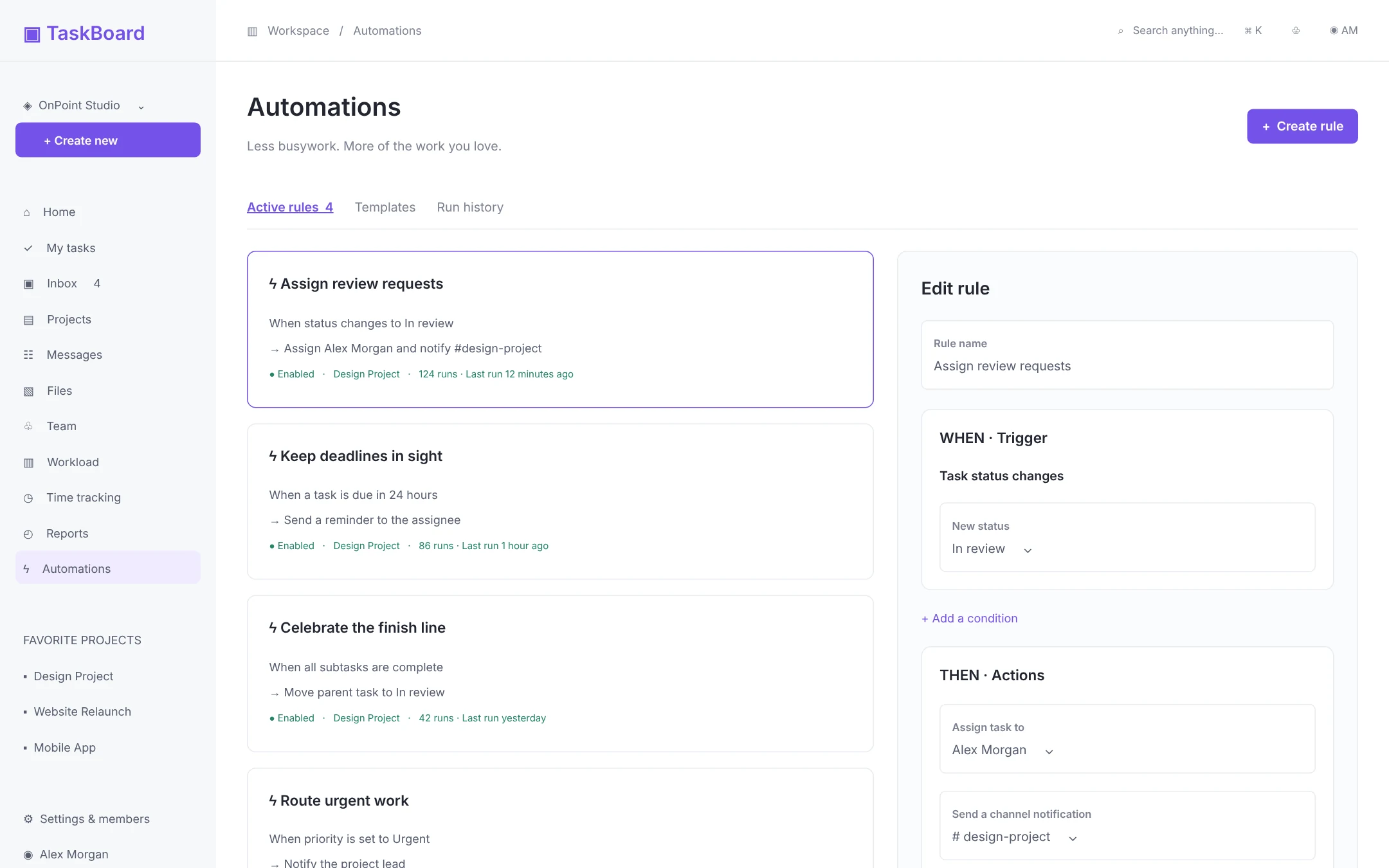
03 / Automations and rule builder

Four active rules sit beside a rule builder that reads as a sentence: WHEN a trigger happens, THEN actions run.

Less busywork, more of the work you love.

How it works

Rules such as assigning review requests when a task moves to In review, reminding assignees 24 hours before a deadline, and notifying the lead on urgent work. Each rule shows its run count and last run, and the builder includes a Test rule action.

A complete product, designed end to end.

The result is a full set of connected screens for a project management SaaS, from first sign-in to billing. It gives a team one place to plan work, follow progress, collaborate on tasks, balance workload, track time, and automate repetitive steps.

01 / SCREENS24

Connected product screens

02 / VIEWS5

Ways to view one project

03 / RULES4

Automation rules in the builder

Back to Works Explore Next Work

07 / Contact

OPEN TO PRODUCT DESIGN COLLABORATIONS

looking for,Team Player?

Have a project in mind? Let’s talk.

BASED IN MYMENSINGH, BANGLADESHWorking closely, wherever you are.
BACK TO TOP ↑